Six services and one question
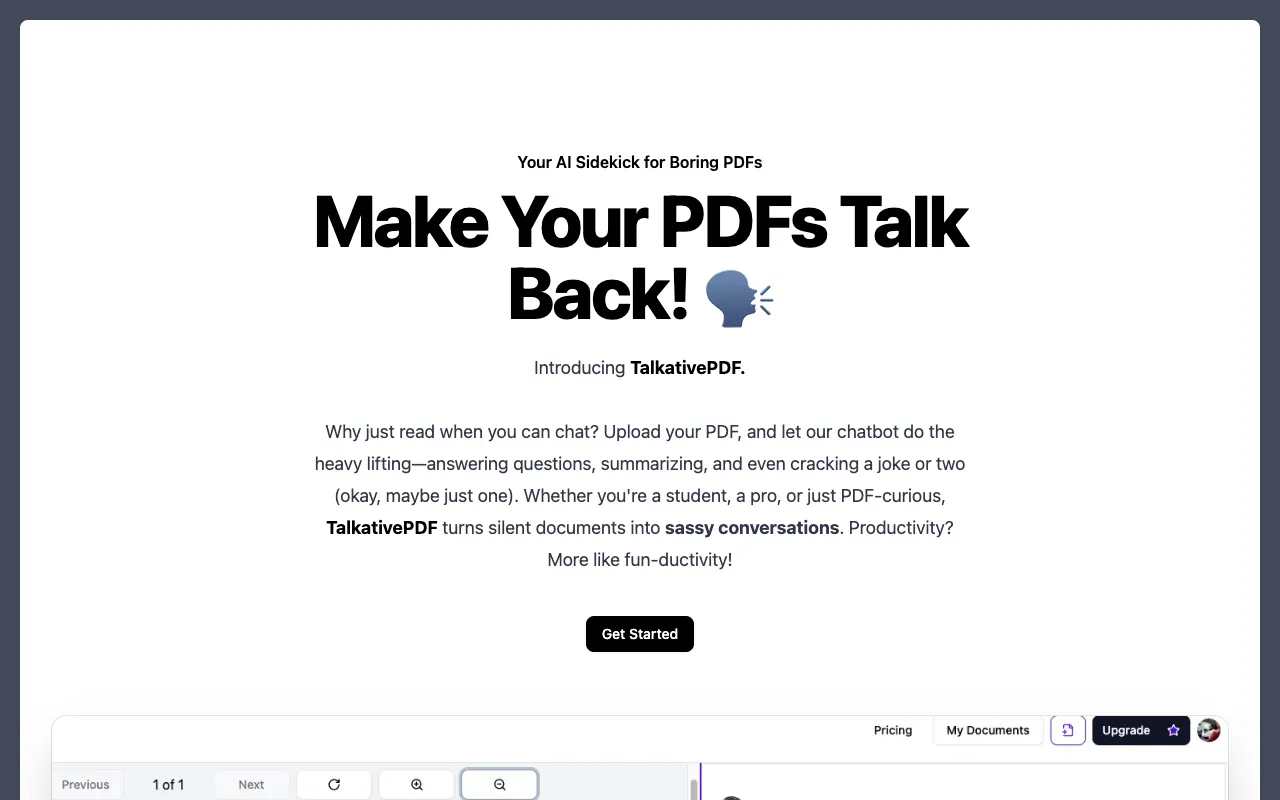
I wanted to understand the chat-with-PDF pattern by wiring every piece myself. Not a notebook demo, but the real thing: sign in, upload, wait for embeddings, ask a question, ask a follow-up that only makes sense in context, and see the answer land next to the page it came from. So in June 2025 I built TalkativePDF and deployed it to Vercel.
TalkativePDF is a Next.js 15 web application that lets a signed-in user upload a PDF, embeds it into a Pinecone vector index, and answers questions about it through a history-aware LangChain retrieval chain backed by OpenAI's gpt-4o-mini, built by Anirudh Vasudevan as a personal project to learn the full RAG stack. Clerk handles identity, Firebase Storage holds the bytes, Firestore holds metadata and chat history, and Stripe gates a Pro tier. Six services for one feature, which is the point: the hard part of RAG is rarely the retrieval math. It is the plumbing.
TalkativePDF follows the structure of a "Chat with PDF" tutorial build; the tutorial is not named in the repo, but a leftover comment in components/PdfView.tsx still names its Storage bucket. What I own is the line-by-line read, the Next 15 and Clerk v6 updates, the production CORS fix, and an honest account of what works and what does not.
Why one Pinecone namespace per document
The first design question in any chat-with-PDF app is isolation. When a user asks about their third PDF, retrieval must see only that PDF's chunks. The obvious approach is a single index with a docId field in each vector's metadata and a filter on every query. That works, but a bug in the filter leaks one document's text into another's answers.
TalkativePDF uses one Pinecone namespace per document, named after the Firestore document id. Namespaces are a hard partition: a retriever opened on one cannot see another. Deleting a document becomes index.namespace(docId).deleteAll(), one call with no filter to get wrong. The cost is that describeIndexStats() becomes the way to ask "have I already embedded this?", and it returns stats for every namespace, which will not scale. For a portfolio app it was the right trade.
The second question was where chat state should live. I could have kept messages in React state and sent the history with every request. Instead TalkativePDF writes every turn into a Firestore subcollection at users/{uid}/files/{docId}/chat, and the browser subscribes to it with react-firebase-hooks. The server action never returns the answer; it writes it to Firestore and the client sees it arrive in the snapshot. That gave me persistence, multi-tab sync, and a history the server can read back.
The third constraint was cost. Every question runs two model calls (one to rewrite the query, one to answer) plus an embedding call, so the model is gpt-4o-mini and the free tier is capped at two questions per document.
What a user sees
- The landing page is a Tailwind hero over a
react-three-fibercanvas with a floating "PDF" box and "AI" sphere (components/ThreePDFScene.tsx). Get Started goes to/dashboard, andmiddleware.tsredirects anyone without a Clerk session to/sign-in. - The dashboard lists the user's documents as cards (
components/Documents.tsx), plus a placeholder card that routes to upload or, at the file limit, to pricing. - The upload page is a
react-dropzonearea for one PDF. A daisyUI radial progress shows the percentage while the status walks through uploading, saving, and embedding. - When embeddings finish, the app routes to
/dashboard/files/{id}: areact-pdfviewer with page, rotate and zoom controls beside the chat panel. - The user types a question. Their message and a "Thinking..." bubble appear at once; the answer replaces the placeholder a few seconds later.
- Free accounts get two documents and two questions per document. The pricing page offers a Pro plan through Stripe Checkout; Pro users get a Billing Portal button and can delete documents.
Architecture
TalkativePDF is one Next.js 15 App Router project with no separate backend. Server actions in actions/ do the privileged work with firebase-admin, Pinecone and OpenAI, and client components talk to Firebase directly only for the upload, the metadata write, and live reads.
Reading left to right: the browser signs in through Clerk, uploads bytes straight to Firebase Storage, writes the metadata document, and subscribes to the chat subcollection. Each server action starts with Clerk's auth() and scopes every Firestore path under the userId. lib/langchain.ts is the only module that calls OpenAI, and apart from the delete action it is the only one that touches Pinecone: it fetches the PDF from its download URL, splits and embeds it into a namespace, and later runs the retrieval chain. Stripe sits off to the side: server actions open Checkout and the Billing Portal, and a purchase is supposed to flip hasActiveMembership, which is why that arrow is dashed.
The main choices in the code and the reason for each:
| Layer | Choice | Why |
|---|---|---|
| Framework | Next.js 15.3 App Router, React 19, server actions | One Vercel deploy, privileged code stays server-side |
| Auth | Clerk v6 clerkMiddleware plus auth() in every action | Three public routes; userId scopes every data path |
| File bytes | Firebase Storage via uploadBytesResumable from the browser | Progress events; the upload bypasses the Next server |
| Metadata and chat | Firestore, client reads with react-firebase-hooks and the metadata write with the Firebase SDK, chat writes with firebase-admin | Live onSnapshot makes Firestore the chat transport |
| Chunking | PDFLoader from @langchain/community plus default RecursiveCharacterTextSplitter | Fast to wire; defaults were enough for the demo |
| Vectors | Pinecone, one namespace per docId, OpenAIEmbeddings | Hard isolation between documents, one-call delete |
| Generation | ChatOpenAI with gpt-4o-mini in a createRetrievalChain | Cheap enough to run twice per question |
| Viewer | react-pdf with the pdf.js worker from unpkg, CORS set from cors.json | Browser fetches the PDF directly from Storage |
| Billing | Stripe Checkout and Billing Portal from server actions | Standard subscription flow, no custom payment UI |
How it works
One id across upload, metadata and vectors
hooks/useUpload.ts generates a uuidv4() for the new document and uses that one id for the Storage path users/{uid}/files/{id}, the Firestore document at the same logical path, and later the Pinecone namespace. One id across three systems lets actions/deleteDocument.ts remove the Firestore doc, the Storage object and the whole Pinecone namespace in three calls.
The upload's completion callback fetches the download URL, writes {name, size, type, downloadUrl, ref, createdAt} to Firestore, then awaits the generateEmbeddings server action. Only then does the hook set fileId, which components/FileUploader.tsx watches to router.push to the chat page, so nobody reaches the chat before the vectors exist.
Checking Pinecone before embedding
generateEmbeddingsInPineconeVectorStore in lib/langchain.ts runs at upload time and again at the start of every question, so it first asks Pinecone whether the namespace exists:
// lib/langchain.ts
async function namespaceExists(
  index: Index<RecordMetadata>,
  namespace: string
) {
  if (namespace === null) throw new Error("No namespace value provided.");
  const { namespaces } = await index.describeIndexStats();
  return namespaces?.[namespace] !== undefined;
}
If it exists, the function returns PineconeStore.fromExistingIndex on it and no PDF is downloaded. If not, generateDocs(docId) reads the download URL from Firestore, fetches the PDF, hands the Blob to PDFLoader, splits with RecursiveCharacterTextSplitter defaults, and PineconeStore.fromDocuments embeds and upserts every chunk into the namespace.
Rewriting the question before retrieving
A naive RAG loop embeds the user's literal question and searches. That breaks on follow-ups: "and the second one?" embeds to nothing useful. TalkativePDF builds a history-aware retriever instead.
generateLangchainCompletion loads this document's chat history from Firestore, maps each row to a HumanMessage or AIMessage, and builds the rephrase prompt:
// lib/langchain.ts
const historyAwarePrompt = ChatPromptTemplate.fromMessages([
  ...chatHistory, // Insert the actual chat history here

  ["user", "{input}"],
  [
    "user",
    "Given the above conversation, generate a search query to look up in order to get information relevant to the conversation",
  ],
]);
createHistoryAwareRetriever({ llm: model, retriever, rephrasePrompt }) wraps pineconeVectorStore.asRetriever(): gpt-4o-mini first turns the conversation plus the new question into a standalone search query, and that query is what gets embedded and sent to Pinecone. The library skips the rewrite when chat_history is empty, but that branch never fires here: the human turn is already in Firestore by the time the history is read.
The second half is a createStuffDocumentsChain whose prompt is a system message, "Answer the user's questions based on the below context," with {context} filled by the retrieved chunks, then the same history and the user's input. createRetrievalChain joins the two; one invoke({ chat_history, input }) returns reply.answer.
Limits, writes, and the Firestore round trip
actions/askQuestion.ts is the server action the chat form calls. Before any model call it counts the human messages already in the chat subcollection and compares that to the plan:
// actions/askQuestion.ts
const PRO_LIMIT = 20;
const FREE_LIMIT = 2;
// ...
if (!userRef.data()?.hasActiveMembership) {
  if (userMessages.length >= FREE_LIMIT) {
    return {
      success: false,
      message: `You'll need to upgrade to PRO to ask more than ${FREE_LIMIT} questions! 😢`,
    };
  }
}
If the check passes, the action writes the human message, calls generateLangchainCompletion, writes the AI message, and returns { success: true } without the answer. The client gets that through Firestore.
components/Chat.tsx subscribes with useCollection on the chat subcollection ordered by createdAt ascending. On submit it pushes two optimistic messages and runs the action inside useTransition:
// components/Chat.tsx
setMessages((prev) => [
  ...prev,
  { role: "human", message: q, createdAt: new Date() },
  { role: "ai", message: "Thinking...", createdAt: new Date() },
]);

startTransition(async () => {
  const { success, message } = await askQuestion(id, q);
When a snapshot arrives, the effect skips it if the last local message is still the "Thinking..." placeholder, so the snapshot that only holds the human turn does not clobber it. The next snapshot, with the AI turn, replaces the whole list. On success: false the client swaps the placeholder for a "Whoops..." message and a toast.
The hard parts
The CORS fix is in a commit message for a reason. The pdf.js viewer fetches bytes directly from Firebase Storage, a different origin from the Vercel app, so the bucket needs a CORS policy before the viewer works in production. The checked-in cors.json whitelists the Vercel domain and localhost for GET and HEAD, applied once with gsutil cors set.
The chat history has three problems. fetchMessagesFromDB orders by createdAt descending and never reverses, so both prompts see the conversation newest-first; gpt-4o-mini copes, but it is wrong. The .limit() call is commented out, so the whole history loads on every question, harmless under the free cap and unbounded without it. And askQuestion writes the human turn before calling the chain, which then reads history from Firestore, so the current question appears in the history and again as {input}. The history is also spread into ChatPromptTemplate.fromMessages as literal messages instead of a MessagesPlaceholder, so the chat_history passed to invoke only tells the retriever whether to rewrite.
The Pro tier is not wired up. middleware.ts whitelists /api/webhook as public, but no app/api/webhook handler exists. Nothing in the committed code sets hasActiveMembership to true, so a Checkout unlocks nothing until someone flips the flag by hand. And createCheckoutSession stores the Stripe customer id with .set() rather than a merge, which wipes the user document's other fields.
Two more notes: the pricing page promises 3 free and 100 Pro messages while the code enforces 2 and 20, and app/api/embeddings/route.ts is a dead stub with a TODO: Add your embedding logic here.
Results
The repo began as a create-next-app scaffold on May 10, 2025; the real code went up on June 10 in a burst of commits, most of them deployment fixes: dropping Clerk's auth().protect(), an .npmrc for Vercel, service-key newline handling, and the CORS config. It is live at talkative-pdf.vercel.app; the committed code covers sign-in, upload, embedding, the PDF viewer, and history-aware chat on the free tier. There is no award or user count; it is a personal build.
What I would do differently
The first fix is the Stripe webhook. A checkout.session.completed handler that verifies the signature, reads the userId from the customer metadata, and sets hasActiveMembership: true with a merge write is maybe forty lines, and it turns a pricing page into a product.
The second is the history: order it ascending, restore the .limit(), drop the current question from the loaded turns, and feed it through a MessagesPlaceholder("chat_history").
The third is ingestion. The browser uploads the file, then a server action downloads it again to parse it. Streaming the upload straight into PDFLoader would cut one round trip per document and the dependency on a public download URL.
The fourth is cleanup: strip the console.log calls that print chat history and download URLs into Vercel logs, delete the stub route, and make the pricing copy match the constants.
Key takeaways
- Use one id across every system a document touches. The same UUID as the Storage path, the Firestore doc id, and the vector namespace turns a three-system delete into three calls.
- A vector store namespace is a hard partition; a metadata filter is a soft one. Prefer the hard partition for per-user documents until its listing cost becomes a problem.
- Make the "already embedded?" check cheap and call it everywhere. An idempotent ingestion function can run at upload and at question time with no state to track.
- Rewrite follow-up questions before you embed them. A history-aware retriever that turns "what about the second one?" into a standalone query is the biggest quality jump over naive RAG.
- A live database subscription can be your chat transport. Write both turns to Firestore and let the client render the snapshot: persistence and multi-tab sync without a streaming endpoint.
- A pricing page without a webhook is a mockup. Wire the event that flips the entitlement flag before you ship the upgrade button.
FAQ
How does TalkativePDF keep one PDF's answers separate from another's?
TalkativePDF stores each document's chunks in its own Pinecone namespace, named after the document's Firestore id. The retriever for a question is opened on that one namespace with PineconeStore.fromExistingIndex, so chunks from other documents are never candidates.
How does TalkativePDF handle follow-up questions?
TalkativePDF uses LangChain's createHistoryAwareRetriever. Before retrieval, gpt-4o-mini reads the prior chat turns plus the new question and produces a standalone search query, which is what gets embedded and sent to Pinecone. The retrieved chunks then go into a createStuffDocumentsChain prompt with the same history, so the final answer has conversational context too.
Does the TalkativePDF Pro plan actually work?
Not in the committed code. TalkativePDF can create a Stripe Checkout Session and a Billing Portal session, and actions/askQuestion.ts enforces the free and Pro limits server-side, but there is no Stripe webhook handler in the repo, so nothing sets hasActiveMembership after a purchase. Adding a checkout.session.completed webhook is the first item on the fix list.
Links
- Live demo: talkative-pdf.vercel.app
- Source: github.com/anirxdh/TalkativePDF